Talsim consists of three main software components:
1.Client – The graphical user interface (GUI) used to build and manage models, configure simulations, and view results.
2.Engine – The simulation core that runs the hydrological model based on your input and configuration.
3.Server – Manages time series data and serves as a central database for inputs shared across multiple projects or users.
🖥️ How the Components Work Together
Talsim follows a client-server architecture:
•The Client and Engine are typically installed on your local machine.
•The Server can run on the same machine, a network server, or a cloud-hosted system — anywhere accessible via HTTP.
•Multiple clients can connect to the same server, making collaborative work and shared data use easy and consistent.
When you open or create a project in the Talsim Client, you'll be asked to enter the Server address to connect to the central time series database.
|
Time series are stored centrally on the server and can be reused across different projects and scenarios without duplication. |

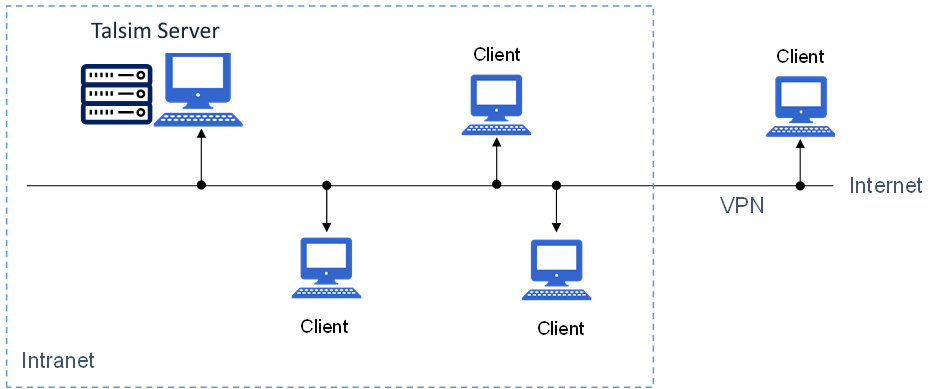
Talsim Server und Client relation
⚙️ Installation Steps
•Client & Engine: Use the provided installer to install both components on your workstation.
•Server: Should be installed on a machine accessible via HTTP. This may be your local machine, a server in your network, or a cloud service. Configuration may require IT support.
System requirements for each component are listed under System Requirements.
