| Create new simulation |
A new empty and inactive simulation is created.
|
| Cut |
The selected simulation is cut out and can be inserted in another variant.
|
| Copy |
The selected simulation is copied and can be pasted in this or any other variant.
|
| Paste |
After cutting or copying the marked simulation, it is inserted in the marked variant.
|
| Rename |
The name of the selected simulation can be changed.
|
| Delete |
The selected simulation is deleted. This operation cannot be undone. Caution: If the activated simulation has been deleted, the variant cannot be copied or exported.
|
| Features |
A window opens in which the simulation settings can be edited.
|
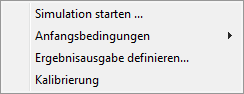
| Simulation |
Further submenu items open:
|
| Activate simulation |
The selected simulation becomes the active simulation ( ). When exporting a variant to the server, the results of the active simulation are used. ). When exporting a variant to the server, the results of the active simulation are used.
|
| Error messages |
|
| Simulation Log |
|
| Export simulation to server |
The results of the selected simulation are exported to the server and assigned to a variant.
|


 ). When exporting a variant to the server, the results of the active simulation are used.